To the page content

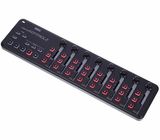
Korg nanoKONTROL 2 black

751 Customer ratings

4.3 / 5

handling

features

quality

44 Reviews

Korg nanoKONTROL 2 black
£48
All prices incl. VAT
In stock
1
RS
Great for the price
R Saca 29.04.2025
I was struggling to find a cheap MIDI controller that had a couple of faders. All I would ever find is extremely well made controllers, with 2-4 faders, but that would start at 100€+.
My use case is for orchestral writing, so faders are extremely handy for being able to control CC1 or CC11 while playing, and the ones on my MIDI keyboard started giving out.
Since this product wasn't created with just that in mind I do feel like, in my use case, there are a couple of extra, unnecessary things, and the range of the faders themselves is pretty short.
That being said at this price point I haven't found anything close to this, and I imagine that if you intend to use the other features, like the rotary controls, you will find this product ideal.
quality
features
handling
0
0
Report

Report

O
Short-lived product....
Octane 05.02.2022
With daily use, faders cease to work correctly on average after six months... This is my seventh such device. But he has a very attractive price! ;)
quality
features
handling
2
0
Report

Report

u
Useful addition to your arsenal
un__ 21.05.2025
This is the perfect tool for general session control. It works great when you want to quickly mute, change volume, solo out, pan, record, play etc.

Very lightweight and can come in clutch. I personally use it with MPK mini MK3 and have 3D printed a stand that makes them very easy to use together.

My only caveat with it is the outdated mini B port that sometimes disconnects it and reconnects it during sessions. It also might have issues with auto mapping, but for me it works out of the box.

My only wish is for Korg to make an updated version with a better port or a budget version of the nanoKONTROL Studio.
quality
features
handling
0
0
Report

Report

A
Good, great for the price, but could be better
Anonymous 10.11.2014
I bought this to have some easy physical control of a home recording setup using the Samson Studio GT interface (bundled with Cakewalk Sonar X1 LE) and a small laptop.

Good things are that life is much easier with physical transport controls plus level on 8 channels plus buttons for record, mute and solo on each channel. Compared to working on a small computer screen it's just faster and easier and more relaxed. So I'm pleased with the purchase and for the price it's excellent value for money.

Less good things are the manual, there are instructions for interfacing with the various DAW software packages but those for Sonar are really not complete and it took me a long time and a lot of false starts to get the nanoKontrol installed and working. There are a few vital steps not explained. The worse thing is that having installed it, I think I've forgotten how I did it so I can't pass it on here. You'll have to study the various settings on your DAW software and read anything you can find online about nanoKontrol.

Also the buttons don't behave completely correctly. I tried switching on the record on all channels (mainly to see what would happen) and on the last channel the button would not light up, but when I pressed a different control the record button did light up.

So that feels like a software problem and I suggest you keep an eye on what settings you have before you start recording. I overwrote a track and I can't work out if I forgot to turn off record on that channel or the software turned it back on for me. But I'm definitely suspicious of it and looking out for random acts of vandalism by the software.

I haven't tried to reassign any of the controls but having read about it it looks like there is not a way to re-assign the rotary 'Pan' control to act as an input gain control. I think that's a midi issue but it's not helpful. I would also like to assign that pot to effects but again it's not clear whether you can do it. Given the vagueness of the instalation instructions I think I'll follow the rule of "if it ain't broke don't fix it" and not bother to try the NanoKontrol software which you need to do any reconfiguration.

So basically it is very good value, it gives you direct control of the main settings for recording and mixing and for the price I don't think there is anything that offers more useful features. It's not a high precision device but it's good enough for a home studio.

As I'm only recording voice and acoustic instruments it is more useful to me to have good controls for 8 channels than the keyboard that comes with most of these midi controllers that offer fewer mixing controls. Anyway I have an old keyboard with midi output if I ever need that.
quality
features
handling
0
0
Report

Report

F
Does it's job and does it well
FloriZ 28.03.2021
Pretty straight forward product. Can't go wrong with this one, considering it's price. Faders and knobs have a good feeling, and are easy to control.
It's lightweight, easy and strong enough for the road.
The material feels a little cheap though, but that is to be expected.
9/10, would advice this controller for everybody.
quality
features
handling
0
0
Report

Report

G
Affordable and Compact
Giorjos 06.12.2024
Nanokontrol2 has too many controls that make it the best compact solution for your DAW.
It feels plasticky, but for its price is well-built.
The only problem: the Drivers. I had to make some changes in the Device Manager (Windows 10), to make it visible to my DAW (Ableton Live 12).
Pros: price, many controls, compact size
Cons: Korg's drivers, short mini-usb cable.
quality
features
handling
0
0
Report

Report

BR
Dumb-dumb doesn't understand
Bryan Robert 20.04.2025
I have had some issues with setting up the device. I have since learned that it is a really easy thing to do, but if you're like me, ask for help. Once it works, it's a convenient device to have for home recording sessions. However, I can live without it.
quality
features
handling
0
0
Report

Report

A
Good solution for some tasks, especially on this price point.
Anonymous 08.05.2016
I purchased this as a DAW controller in order to be able to have a more hands on approach to mixing my songs.
I have to say I was very excited when I first started using it, as having knobs and faders to work with is MUCH easier and feels much better.

The only downside is that the controls are NOT motorized, meaning that you will have a very hard time mixing more than 8 tracks.
All in all, I believe this would be a very cool solution for live musicians working with synths, but not so much for mixing, unless you're automating.

The build quality is good for the price, the faders and knobs don't feel very sturdy and the faders are short throw, but I would say they are good enough to write automation


In conclusion, I would recommend this to either live musicians working with synths who need faders and knobs to assign to different parameters, or mixing engineers looking for a dirt cheap solution for automating volumes or effects.
In my honest opinion, I would rather have a DAW controller with motorized faders such as the Behringer BCF2000 or the Presonus Faderport (also available at Thomann), although the price point is higher.
quality
features
handling
1
3
Report

Report

WS
Easy to set up mini mixing console
White Ship Caused the Anarchy 06.11.2017
I am using this with Cubase 9 and Live 9.

The controller is especially good as it is:
- Not expensive
- Portable
- Powered by a USB ( Therefore only one cable necessary)
- Easy to install in different DAWs
- Soft buttons ensure silent control (good if your a loud spacebar hitter like me :))


I am using it for the following purposes:
- Recording automations
- Position Bar
- On-the-fly crossfading

Highly recommend this as a cost efficient solution that can fit on any studio desk.
quality
features
handling
0
0
Report

Report

BL
Great but aging
Bobby Limes Music 31.07.2023
Plenty of pads, knobs and faders in small form factor. Works really well with Koala Sampler.

The native software isn’t fully functional with my MacBook Pro M2. Looks like you need older operating systems to fully customize the controller.
quality
features
handling
0
0
Report

Report

Korg nanoKONTROL 2 black